
Google Collaboratory or simply “Colab” is a service from Google that allows writing, execution, and sharing of Python code in a notebook through a browser. It focuses on making programming and data-driven workflows easy and removing dependencies on local installations while providing an instantly available environment with all necessary tools. Simply put, Google Colab marries Jupyter Notebook’s capabilities with those of cloud computing bringing in more flexibility and accessibility. People use notebooks to include code notes formulas graphs etc. in one interactive file. Therefore, it is very helpful for learning, doing research, and teamwork.
Features of Google Colab
Google Colab offers users free access to powerful computer resources like Graphics Processing Units (GPUs) and Tensor Processing Units (TPUs). Features like these are a big help especially in developing machine learning and artificial intelligence projects. They allow users to efficiently train and test their models by using popular deep learning libraries such as TensorFlow and PyTorch. At the same time, the environment is friendly to the use of very popular Python modules like Pandas and NumPy, which are instrumental in data analytics and scientific research. The other major upside of this tool is the smooth connection it establishes with Google Drive. Documents, or notebooks as they are called here, can be kept, arranged and shared with ease and even allow for live collaboration just like in Google Docs. This is a wonderful embodiment for teams, teachers and scholars who are at different points and are working.
Users Among Various Sectors
Google Colab is found to be helpful by people from different sectors like data science, academic research, software development, and business analytics. For instance, it facilitates fast development of prototype, enabling users to get ideas, conduct experiments, and visualize results quickly without spending on costly hardware. Besides, the browser interface makes it accessible anytime and anywhere. So, it suits both beginner and experienced computer users.
Drawbacks
Google Colab is not without its drawbacks. Those using the free plan might be interrupted by sudden session termination, have limited time for each run and also have limited availability of top-notch hardware. There is also the requirement of internet connectivity all the time.
Example
# Nepal Election 2026 Analysis (Hypothetical / Based on real result)

import pandas as pd

import matplotlib.pyplot as plt

# Step 1: Create dataset

data = {
    "Party": [
        "Rastriya Swatantra Party",
        "Nepali Congress",
        "CPN-UML",
        "NCP",
        "Others"
    ],
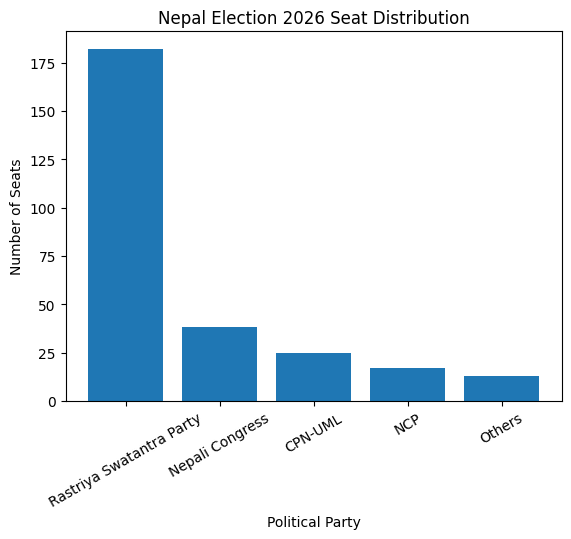
    "Seats": [182, 38, 25, 17, 13]  # total = 275
}

df = pd.DataFrame(data)

# Step 2: Calculate percentage

total_seats = df["Seats"].sum()

df["Percentage"] = (df["Seats"] / total_seats) * 100

print("Election Results:")

print(df)

# Step 3: Majority check

rsp_seats = df[df["Party"] == "Rastriya Swatantra Party"]["Seats"].values[0]

if rsp_seats > (total_seats / 2):
    print("\nRSP has majority government")

if rsp_seats >= (2/3)*total_seats:
    print("RSP has two-thirds majority")

else:
    print("RSP is close to two-thirds majority")

# Step 4: Visualization

plt.figure()

plt.bar(df["Party"], df["Seats"])

plt.xticks(rotation=30)

plt.title("Nepal Election 2026 Seat Distribution")

plt.xlabel("Political Party")

plt.ylabel("Number of Seats")

plt.show()
Note: Paste this into a Colab cell. The code will be run in the below format manner:
Conclusion
In short, Google Colab is an affordable, convenient-to-use product that has opened the doors to advanced computing tools to the masses. It’s simple-to-learn, collaborative, and computationally powerful features and has been transformed into a major platform for education, creativity, as well as modernization in the current digital environment.
